 Loading... Please wait...
Categories
- Home
- Sewing Machines
- Janome 2212
- Home
- Handheld Sewing Machines
- Janome 2212


Product Description
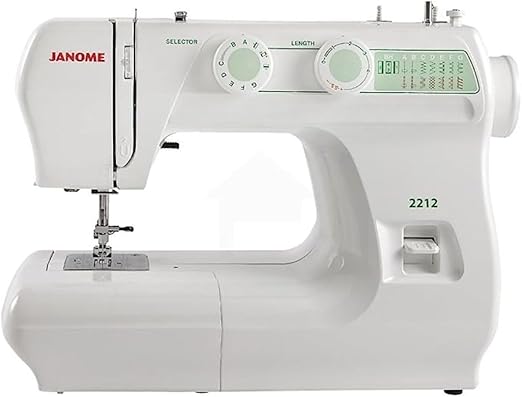
The Janome 2212 is a quality, entry-level mechanical sewing machine that has earned a legendary reputation for its robust construction and reliable performance . Offered at a fantastic price point, this machine strips away complex electronics to focus on the essentials: durable mechanics and consistent stitch quality . It features 12 built-in stitches, a four-step buttonhole, and easy-to-use dial controls, making it the perfect choice for beginners, students, and experienced sewists who need a dependable, no-frills workhorse for everyday sewing and alterations . Its lightweight design and built-in handle also make it an excellent choice for taking to sewing classes .
Key Specifications
Key Features
Robust Mechanical Construction
-
Built to Last: The Janome 2212 is renowned for its exceptional durability, featuring a metal frame (stainless steel bed) and internal metal components . This robust construction ensures stable, vibration-free sewing even at high speeds and on thick fabrics, promising decades of reliable use .
-
Powerful Motor: With a powerful motor, this machine can easily handle a variety of fabrics, from lightweight knits to multiple layers of denim and even light leather or vinyl with the proper needle . Some users report it can sew through 6-10 layers of fabric with ease .
Simple, Intuitive Controls
-
Dial Pattern Selection: Choosing a stitch is straightforward with the clearly labeled, easy-turn stitch selection dial located on the front of the machine .
-
Adjustable Stitch Length and Width: Separate dials allow for manual adjustment of stitch length (up to 4mm) and zigzag width (up to 5mm), giving you complete control over your sewing .
-
Manual Thread Tension Control: An adjustable tension dial lets you fine-tune the thread tension to achieve perfect stitches on different fabrics .
-
Easy Reverse Lever: A conveniently located reverse lever allows you to instantly back-tack and lock your seams for added strength and security .
Versatile Sewing Capabilities
-
12 Essential Stitches: Includes all the stitches needed for most projects: straight stitch, zigzag, blind hem, stretch stitches for knits, and decorative stitches .
-
Four-Step Buttonhole: Creates neat, professional-looking buttonholes in four simple steps .
-
Drop Feed for Free-Motion Work: The feed dogs can be easily lowered, allowing for free-motion quilting, darning, and embroidery .
-
Extra-High Presser Foot Lift: Provides additional clearance for sewing bulky layers or thick fabrics .
-
Free Arm: The removable storage compartment converts the machine into a free arm, making it effortless to sew cuffs, sleeves, and other tubular items .
User-Friendly Design
-
Lightweight & Portable: Weighing only 13 lbs and featuring a built-in carry handle, the 2212 is easy to transport to classes or retreats .
-
Snap-On Presser Feet: Changing presser feet is quick and easy with the snap-on system .
-
Push-Pull Bobbin Winder: The simple and effective bobbin winder makes filling bobbins quick and convenient .
-
Dual Spool Pins: Two retractable, vertical spool pins allow for sewing with twin needles or using large spools of thread .
-
Built-in Thread Cutter: A small blade on the side of the machine provides a quick and handy way to cut threads .
Warranty Information
Find Similar Products by Tag
Find Similar Products by Category

Customers Who Viewed This Product Also Viewed
-
 $15,000.00
-
 $330.00
-
 $105.00
-
 $120.00
Add to Wish List
Related Products
-
 Janome HD1000 $135.00
-
-
Janome 3160QDC-G $330.00
-
 Janome Skyline S6 $720.00
-
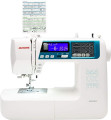 Janome 4300QDC-B $650.00
You Recently Viewed...
